Agents and Subagents
Specialized AI assistants that handle tasks independently with isolated context and custom tool access.
Claude Code Agents and Subagents
Agents are specialized AI assistants that handle specific types of tasks independently. Each agent runs in its own isolated context window with a custom system prompt, specific tool access controls, independent permissions, and full conversation history isolation.
Overview
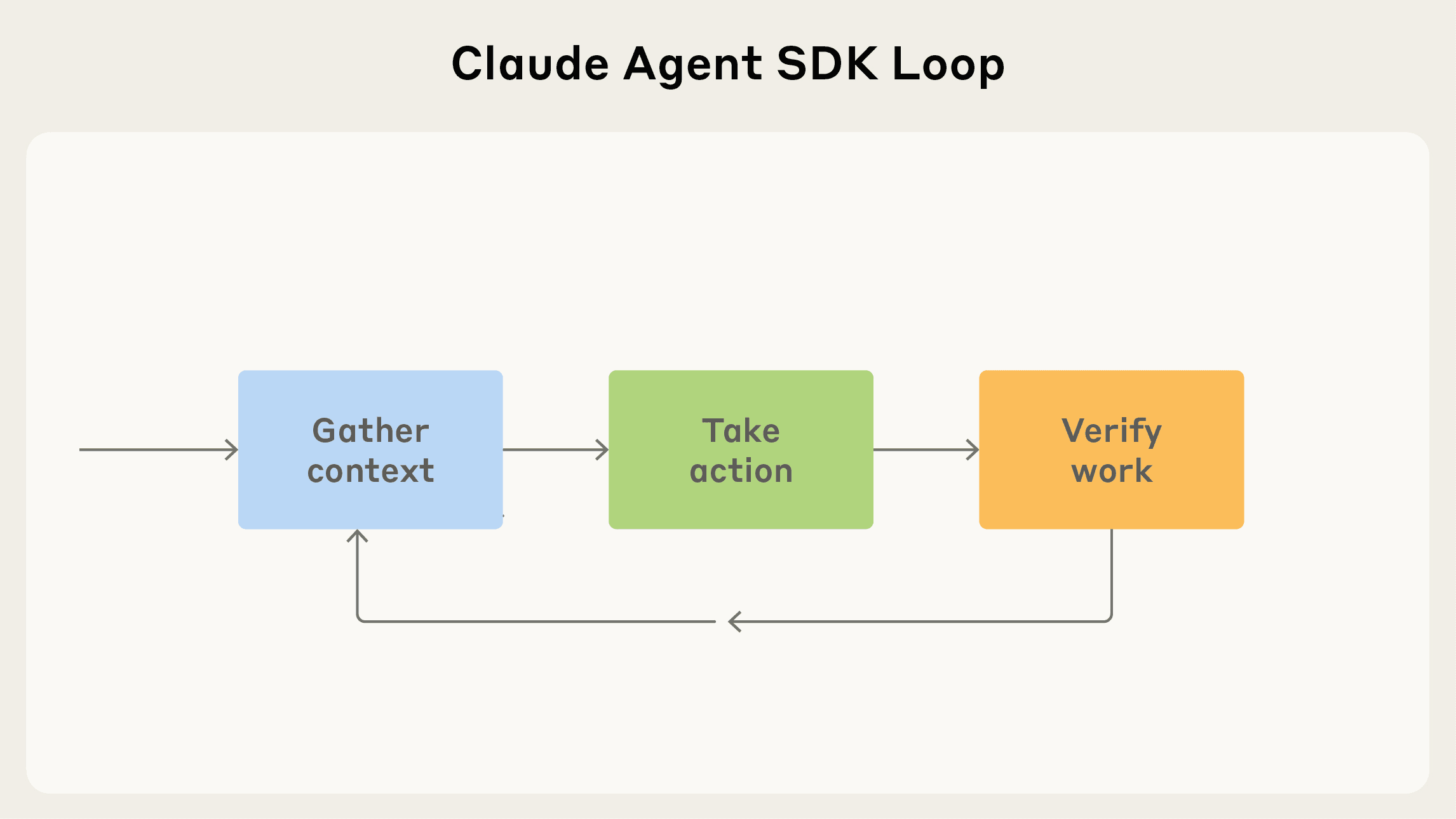 Source: Building agents with the Claude Agent SDK — the core loop that every Claude Code agent (main session, subagent, or teammate) runs.
When Claude encounters a task that matches an agent's description, it automatically delegates to that agent. The agent works independently and returns results to the main conversation.
Key Benefits:
- Preserve context by keeping exploration and implementation separate
- Enforce tool restrictions for security and focus
- Reuse configurations across projects
- Specialize behavior for specific domains
- Control costs by routing tasks to faster, cheaper models
Built-in Agent Types
Explore Agent
- Model: Haiku (fast, low-latency)
- Tools: Read-only tools only (no Write or Edit)
- Purpose: File discovery, code search, codebase exploration
- Thoroughness levels: Quick, Medium, Very Thorough
Plan Agent
- Model: Inherits from main conversation
- Tools: Read-only tools only
- Purpose: Codebase research during plan mode
- Restriction: Cannot spawn other subagents
General-Purpose Agent
- Model: Inherits from main conversation
- Tools: All tools available
- Purpose: Complex, multi-step tasks requiring exploration and action
Other Built-in Agents
| Agent | Model | Purpose |
|---|---|---|
| Bash | Inherits | Running terminal commands in separate context |
| statusline-setup | Sonnet | When running /statusline command |
| Claude Code Guide | Haiku | When asking about Claude Code features |
Using the Task Tool
Automatic Delegation
Claude automatically delegates based on:
- Agent's description field
- Task requirements
- Current context
Explicit Requests
Use the code-reviewer agent to suggest improvements
Have the debugger subagent investigate the login issue
Use a subagent to run tests and report failures only
Background vs. Foreground Execution
Foreground (blocking):
- Blocks main conversation until complete
- Allows permission prompts and clarifying questions
- Best for interactive workflows
Background (concurrent):
- Runs while you continue working
- Auto-denies unpre-approved permissions
- MCP tools not available
- Can be resumed later
How to background:
- Ask: "Run this task in the background"
- Press
Ctrl+Bduring execution (Tmux users: press twice)
Disable background tasks:
export CLAUDE_CODE_DISABLE_BACKGROUND_TASKS=1Creating Custom Agents
Using /agents Command
- Run
/agents - Select "Create new agent"
- Choose scope (User-level or Project-level)
- Select "Generate with Claude" and describe your agent
- Select tools, model, and color
- Save and use immediately
Agent File Structure
Agents are Markdown files with YAML frontmatter:
---
name: code-reviewer
description: Expert code review specialist. Proactively reviews code for quality, security, and maintainability.
tools: Read, Grep, Glob, Bash
model: sonnet
permissionMode: default
---

You are a senior code reviewer ensuring high standards.

When invoked:
1. Run git diff to see recent changes
2. Focus on modified files
3. Begin review immediately
Frontmatter Fields
| Field | Required | Description |
|---|---|---|
name | Yes | Unique identifier (lowercase, hyphens) |
description | Yes | When Claude should delegate to this agent |
tools | No | Which tools agent can use (comma-separated). Inherits all if omitted |
disallowedTools | No | Tools to deny/block (applied before tools) |
model | No | sonnet, opus, haiku, full model ID, or inherit (default) |
permissionMode | No | Permission handling mode |
mcpServers | No | MCP servers: name references or inline definitions |
maxTurns | No | Maximum agentic turns before stopping |
skills | No | Skills to preload into agent context (full content injected) |
hooks | No | Lifecycle hooks scoped to this agent |
memory | No | Persistent memory scope: user, project, or local |
effort | No | Effort level override: low, medium, high, max (Opus 4.6 only) |
background | No | Set to true to always run as background task |
isolation | No | Set to worktree for isolated git worktree copy |
color | No | Display color: red, blue, green, yellow, purple, orange, etc |
initialPrompt | No | Auto-submitted first user turn with --agent or agent setting |
Permission Modes
| Mode | Behavior |
|---|---|
default | Standard permission checking |
acceptEdits | Auto-accept file edits |
auto | AI-powered safety classifier (inherited from parent, cannot override) |
dontAsk | Auto-deny prompts (allowed tools still work) |
bypassPermissions | Skip all permission checks (parent takes precedence if set) |
plan | Plan mode (read-only exploration) |
Model Configuration
model: sonnet        # High capability
model: opus          # Maximum capability
model: haiku         # Fast and cheap
model: inherit       # Same as parent
Using Hooks with Agents
---
name: db-reader
description: Execute read-only database queries
tools: Bash
hooks:
  PreToolUse:
    - matcher: "Bash"
      hooks:
        - type: command
          command: "./scripts/validate-readonly-query.sh"
---
Agent Scopes
| Location | Scope | Priority |
|---|---|---|
--agents CLI flag | Current session only | 1 (highest) |
.claude/agents/ | Current project | 2 |
~/.claude/agents/ | All your projects | 3 |
Plugin's agents/ | Where plugin installed | 4 (lowest) |
CLI-Defined Agents
claude --agents '{
  "code-reviewer": {
    "description": "Expert code reviewer",
    "prompt": "You are a senior code reviewer...",
    "tools": ["Read", "Grep", "Glob"],
    "model": "sonnet"
  }
}'
Running a Session as an Agent
Use --agent to start a session where the main thread uses a subagent's system prompt, tools, and model:
claude --agent code-reviewerWorks with built-in and custom agents. The choice persists when you resume the session.
Agent Tool Restrictions
Use Agent(agent_type) syntax in the tools field to control which subagents can be spawned:
# Only allow spawning specific agents
tools: Agent(worker, researcher), Read, Bash

# Allow spawning any agent
tools: Agent, Read, Bash
If Agent is omitted from tools entirely, the agent cannot spawn subagents.
Persistent Memory
The memory field gives subagents a persistent directory that survives across conversations:
---
name: code-reviewer
description: Expert code reviewer
memory: user
---| Scope | Storage Location |
|---|---|
user | ~/.claude/agent-memory/<name>/ |
project | Per working tree, like auto memory |
local | Per working tree, private to this machine |
The subagent accumulates insights over time (codebase patterns, debugging tips, architecture decisions).
MCP Servers in Subagents
Give a subagent access to MCP servers by name reference or inline definition:
---
name: data-analyst
description: Analyze data using database tools
mcpServers:
  db: {}
  custom-api:
    command: npx
    args: ["-y", "custom-api-server"]
---
String references share the parent session's connection. Inline servers are connected when the subagent starts and disconnected when it finishes.
Background Agents
How They Work
- Run asynchronously while main conversation continues
- Have unique task IDs for tracking
- Buffered output retrievable via TaskOutput tool
- Auto-deny unpre-approved permissions
- Automatically cleaned up on exit
Managing Background Agents
# List background agents
/tasks

# Or ask Claude
show me all tasks
list background agents
Resuming Agents
Use the code-reviewer agent to review the auth module
[Agent completes and returns agent ID]

Continue that code review and analyze authorization logic
The resumed agent retains full conversation history.
Use Cases
Explore Agent
Research the authentication, database, and API modules in parallel
Use a subagent to investigate how token refresh works
Use the Explore agent to find all error handling code
Plan Agent
claude --permission-mode plan
# "I need to refactor authentication to use OAuth2. Create a migration plan."
Custom Code Review Agent
Use the code-reviewer agent to suggest improvementsCustom Debugger Agent
Have the debugger subagent investigate why users can't log inBest Practices
Design Focused Agents
Each agent should excel at one specific task:
- Good:
code-reviewer,db-reader,security-reviewer - Avoid:
all-purpose-helper
Write Detailed Descriptions
# Good
description: Expert code reviewer. Proactively reviews code for quality, security, and maintainability. Use immediately after writing or modifying code.

# Avoid
description: Review code
Limit Tool Access
# Code reviewer doesn't need to modify files
tools: Read, Grep, Glob, Bash
disallowedTools: Write, Edit
Check Project Agents Into Version Control
git add .claude/agents/
git commit -m "feat: add code-reviewer and security-reviewer agents"
Use Subagents for Investigation
Use a subagent to run the test suite and report only failing testsRun Independent Research in Parallel
Research the authentication, database, and API modules in parallel using separate subagentsChain Agents for Workflows
Use the code-reviewer agent to find issues, then use the fixer agent to resolve themResource Limits
Agents operate within the following constraints:
| Resource | Limit | Notes |
|---|---|---|
| Context window | Same as parent model | Shared token budget |
| Max turns | Configurable via max_turns | Default: unlimited |
| Timeout | No hard limit | Use --max-turns for control |
| Concurrent agents | Platform-dependent | Background tasks may queue |
Controlling agent execution:
# Limit agentic turns
claude -p "Review code" --max-turns 10

# Set spending limit
claude -p "Analyze project" --max-budget-usd 5.00
Environment variables:
| Variable | Purpose |
|---|---|
CLAUDE_CODE_SUBAGENT_MODEL | Override model for all subagents |
CLAUDE_CODE_DISABLE_BACKGROUND_TASKS | Disable background execution |
Context Management
Auto-compaction:
- Agents support automatic compaction at ~95% capacity
- Trigger earlier:
CLAUDE_AUTOCOMPACT_PCT_OVERRIDE=50
Transcript persistence:
- Agent transcripts persist within their session
- Can resume after Claude Code restart
- Cleaned up after 30 days (default)