Security and Sandbox
Native sandboxing, permission boundaries, and enterprise policy management for Claude Code.
Claude Code Security and Sandbox
Claude Code features comprehensive security controls including native sandboxing, permission boundaries, and enterprise-grade policy management. In testing, sandboxing achieved an 84% reduction in permission prompts, addressing approval fatigue and enabling more autonomous workflows.
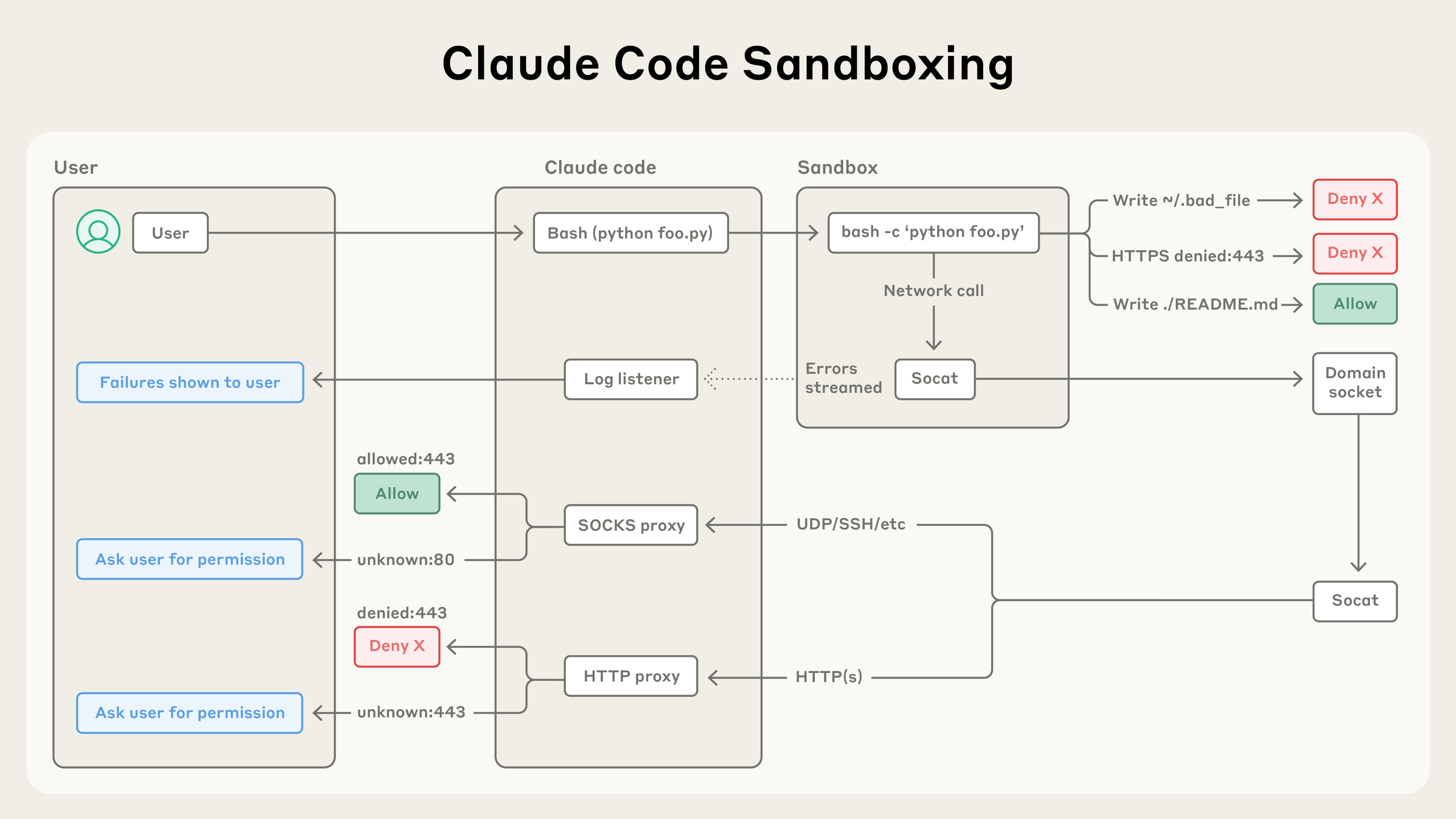 Source: Beyond permission prompts: making Claude Code more secure and autonomous
Sandbox Mode
Overview
Native sandboxing provides filesystem and network isolation while reducing permission prompts. Instead of asking permission for each bash command, sandboxing creates defined boundaries where Claude Code can work more freely with reduced risk. The sandboxed bash tool uses OS-level primitives to enforce both filesystem and network isolation.
Sandbox Modes
- Auto-allow mode: Bash commands execute within sandbox boundaries without permission prompts
- Regular permissions mode: All bash commands require explicit approval
Enabling Sandboxing
/sandbox # Interactive menuOr configure in settings.json:
{
  "sandbox": {
    "enabled": true,
    "autoAllowBashIfSandboxed": true
  }
}
Platform Support
| Platform | Support | Notes |
|---|---|---|
| macOS | ✅ Native | Uses Seatbelt framework |
| Linux | ✅ Supported | Requires bubblewrap and socat |
| WSL2 | ✅ Supported | Uses bubblewrap |
| WSL1 | ❌ Not supported | Missing kernel features (bubblewrap requires WSL2) |
| Windows | 🔄 Planned | Check docs for status |
Note: Platform support evolves. Check the official sandbox documentation for the latest status.
If the sandbox cannot start (missing dependencies, unsupported platform), Claude Code shows a warning and runs commands without sandboxing. To make this a hard failure instead, set sandbox.failIfUnavailable to true in your settings. This is intended for managed deployments that require sandboxing as a security gate.
Network Isolation
Network access is controlled through a proxy server running outside the sandbox. This ensures restrictions apply to all scripts, programs, and subprocesses spawned by commands.
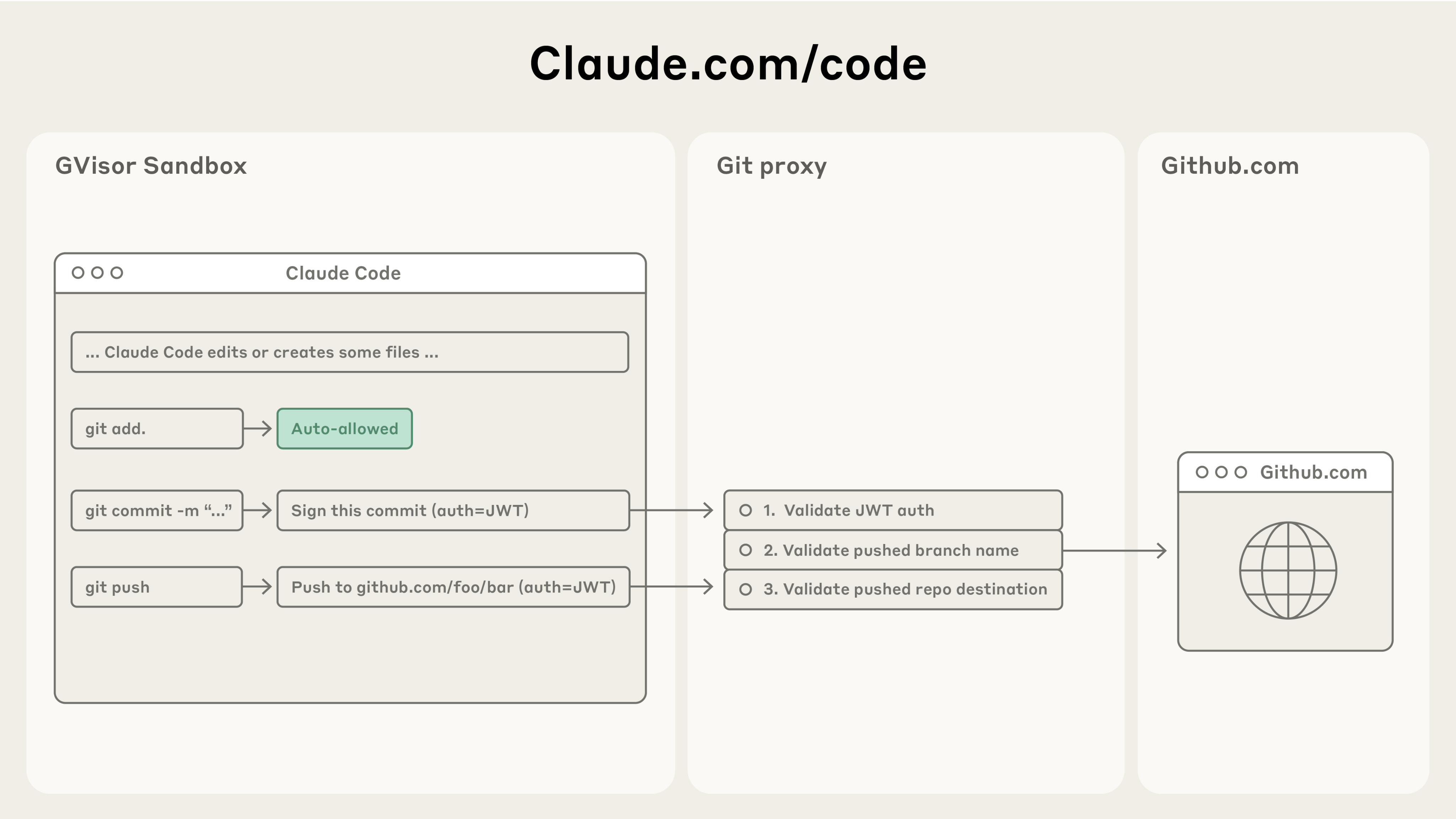 Source: Beyond permission prompts: making Claude Code more secure and autonomous
Cloud Environment
Three access levels:
- Limited (default): Only allowlisted domains
- Disabled: No internet access
- Full: Complete internet access
Default Allowlist
Includes:
- Anthropic services (api.anthropic.com, claude.ai)
- Version control (GitHub, GitLab, Bitbucket)
- Container registries (Docker, GCR, ECR)
- Package managers (npm, PyPI, RubyGems, etc.)
- Cloud platforms (AWS, Azure, GCP)
When Claude Code attempts to access a domain not in the allowlist, the operation is blocked at the OS level and you receive a notification. You can deny the request, allow it once, or permanently update your configuration.
Configuration
{
  "sandbox": {
    "network": {
      "allowedDomains": ["example.com"],
      "blockedDomains": ["untrusted.com"],
      "httpProxyPort": 8080,
      "socksProxyPort": 8081
    }
  }
}
When allowManagedDomainsOnly is enabled in managed settings, non-allowed domains are blocked automatically without user prompts.
File System Restrictions
Default Behavior
- Write access: Current working directory and subdirectories only
- Read access: Entire computer except denied directories
- Boundary: Cannot modify parent directories without permission
Extending Access
# During session
/add-dir /path/to/directory

# CLI flag
claude --add-dir /path/to/directory
Persistent Configuration
{
  "permissions": {
    "additionalDirectories": ["../docs/", "/shared/resources"]
  }
}
Subprocess Write Access
If subprocess commands like kubectl, terraform, or npm need to write outside the project directory:
{
  "sandbox": {
    "enabled": true,
    "filesystem": {
      "allowWrite": ["~/.kube", "/tmp/build"]
    }
  }
}
Path prefixes:
| Prefix | Meaning |
|---|---|
/ | Absolute path from filesystem root |
~/ | Relative to home directory |
./ or no prefix | Relative to project root (project settings) or ~/.claude (user settings) |
When allowWrite, denyWrite, denyRead, or allowRead is defined in multiple settings scopes, the arrays are merged (not replaced).
Blocked Directories
Cannot modify by default:
/bin/, system binaries.bashrc,.zshrc- Critical system files
Escape Hatch
When a command fails due to sandbox restrictions, Claude Code may retry with the dangerouslyDisableSandbox parameter. Commands using this parameter go through the normal permissions flow requiring user approval.
To disable this escape hatch entirely:
{
  "sandbox": {
    "allowUnsandboxedCommands": false
  }
}
When disabled, all commands must run sandboxed or be explicitly listed in excludedCommands.
Permission System
Permission Modes
| Mode | Description |
|---|---|
default | Prompts on first use |
acceptEdits | Auto-accepts file edits |
plan | Read-only analysis only |
dontAsk | Auto-denies unless pre-approved |
auto | AI-classified safety checks |
bypassPermissions | Skips all prompts |
For comprehensive documentation on auto mode, including classifier architecture, configuration, and threat model, see Auto Mode.
Permission Rules
{
  "permissions": {
    "allow": [
      "Bash(npm run:*)",
      "Read(./src/**)",
      "WebFetch(domain:github.com)"
    ],
    "ask": [
      "Bash(git push:*)"
    ],
    "deny": [
      "Bash(rm -rf:*)",
      "Read(.env)",
      "Read(./secrets/**)"
    ]
  }
}
Rule Evaluation
Order: deny → ask → allow (first match wins)
Tool-Specific Patterns
Bash (prefix matching):
"Bash(npm run test:*)"  // Word boundary
"Bash(npm *)"           // Anywhere match
Read/Edit (gitignore patterns):
"Read(//Users/alice/**)"  // Absolute path
"Read(~/Documents/*.pdf)" // Home directory
"Edit(/src/**/*.ts)"      // Relative to settings
WebFetch (domain-based):
"WebFetch(domain:example.com)"MCP (server and tool):
"mcp__github__*"
"mcp__memory__create_entities"
Enterprise Security Controls
Managed Settings
System-level policy in managed-settings.json:
Locations:
- macOS:
/Library/Application Support/ClaudeCode/managed-settings.json - Linux:
/etc/claude-code/managed-settings.json - Windows:
C:\Program Files\ClaudeCode\managed-settings.json
MCP Security Policies
{
  "allowedMcpServers": [
    { "serverName": "github" },
    { "serverUrl": "https://mcp.company.com/*" }
  ],
  "deniedMcpServers": [
    { "serverName": "untrusted-server" }
  ]
}
Settings Precedence
- Managed settings (highest)
- Command-line arguments
- Local project settings
- Shared project settings
- User settings (lowest)
Audit Logging
OpenTelemetry Metrics
Enable with:
export CLAUDE_CODE_ENABLE_TELEMETRY=1Available Metrics:
- Session counter
- Lines of code counter
- Pull request counter
- Commit counter
- Cost counter
- Token counter
- Active time counter
Available Events:
- User prompt events
- Tool result events
- API request events
- API error events
Custom Attributes
export OTEL_RESOURCE_ATTRIBUTES="team=frontend,department=engineering"Safe Mode Operations
Built-In Protections
- Sandboxed bash: OS-level filesystem and network isolation
- Write restriction: Only current directory by default
- Accept Edits mode: Batch accept edits while maintaining command safety
- Command blocklist: curl, wget blocked by default
Prompt Injection Protections
- Permission system requiring explicit approval
- Context-aware analysis detecting harmful instructions
- Input sanitization preventing command injection
- Command injection detection with warnings
- Fail-closed matching (unmatched defaults to manual approval)
Security Limitations
- Network filtering: The network proxy restricts domains but does not inspect traffic content. Users are responsible for only allowing trusted domains. Broad domains like
github.commay allow data exfiltration. Domain fronting may bypass network filtering in some cases. - Unix sockets: The
allowUnixSocketsconfiguration can grant access to powerful system services (e.g.,/var/run/docker.sock) that could bypass the sandbox. - Filesystem escalation: Overly broad write permissions to directories containing executables in
$PATH, system config directories, or shell config files can enable privilege escalation. - Linux nested sandbox: The
enableWeakerNestedSandboxmode for Docker environments considerably weakens security and should only be used where additional isolation is otherwise enforced.
What Sandboxing Does Not Cover
The sandbox isolates Bash subprocesses. Other tools have different boundaries:
- Built-in file tools: Read, Edit, and Write use the permission system directly rather than running through the sandbox.
- Computer use: When Claude controls your screen, it runs on your actual desktop rather than in an isolated environment. Per-app permission prompts gate each application.
Development Containers
Security Benefits
- Isolated virtual machines per session
- Custom firewall restricting network
- Enhanced isolation for
--dangerously-skip-permissions - Default-deny network policy
Limitations
- Does not prevent exfiltration of accessible data
- Only use with trusted repositories
- Requires monitoring of Claude activities
Quick Reference
Enable Sandboxing
/sandboxView Permissions
/permissionsAdd Directory Access
/add-dir /path/to/directoryPlan Mode (Safe Analysis)
claude --permission-mode planCheck Sandbox Status
{
  "sandbox": {
    "enabled": true,
    "autoAllowBashIfSandboxed": true
  }
}
Open Source Sandbox Runtime
The sandbox runtime is available as an open source npm package for use in your own agent projects:
npx @anthropic-ai/sandbox-runtime <command-to-sandbox>This enables the broader AI agent community to build safer autonomous systems. It can also sandbox other programs, such as MCP servers.
For implementation details and source code, visit the GitHub repository.