MCP Servers
Open standard for connecting Claude Code to external tools, databases, APIs, and data sources.
Claude Code MCP (Model Context Protocol) Servers
MCP is an open-source standard for connecting AI applications to external systems. Think of MCP like a USB-C port for AI applications - it provides a standardized way to integrate Claude Code with external tools, databases, APIs, and data sources.
Overview
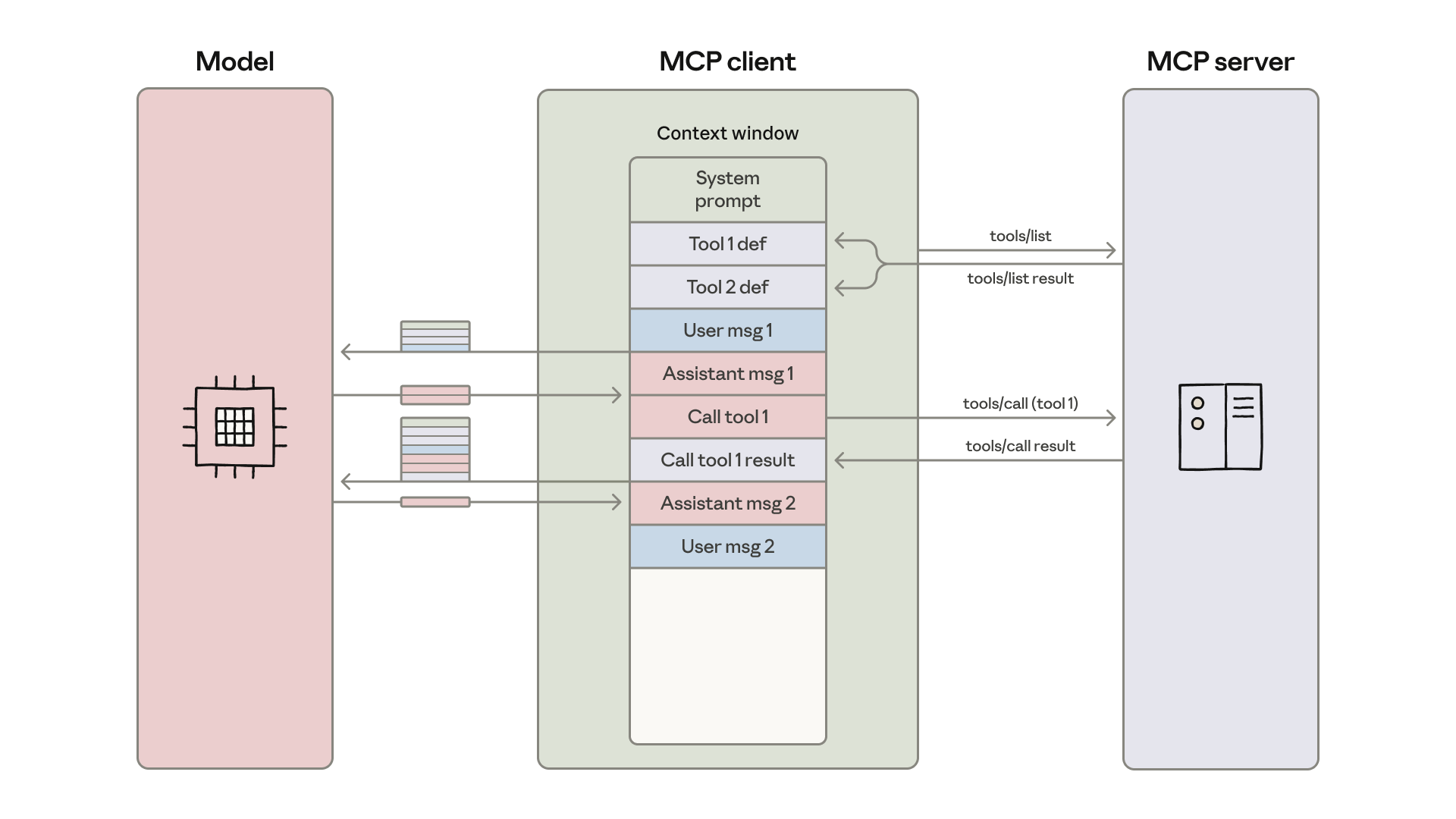 Source: Code execution with MCP — the MCP client loads tool definitions into the model's context window and orchestrates the loop between tool calls and results.
MCP enables Claude Code to:
- Access databases and query data
- Integrate with third-party APIs and services
- Implement features from issue trackers
- Analyze monitoring data
- Automate workflows
- Access your tools and integrations seamlessly
Configuration Methods
Claude Code supports three transport types for MCP servers:
Remote HTTP Servers (Recommended)
HTTP servers are ideal for cloud-based services:
# Basic syntax
claude mcp add --transport http <name> <url>

# Example: Connect to Notion
claude mcp add --transport http notion https://mcp.notion.com/mcp

# With authentication
claude mcp add --transport http secure-api https://api.example.com/mcp \
  --header "Authorization: Bearer your-token"
Remote SSE Servers (Deprecated)
Server-Sent Events transport for legacy servers:
claude mcp add --transport sse asana https://mcp.asana.com/sseLocal Stdio Servers
Stdio servers run as local processes:
# Basic syntax
claude mcp add [options] <name> -- <command> [args...]

# Example: Add Airtable server
claude mcp add --transport stdio --env AIRTABLE_API_KEY=YOUR_KEY airtable \
  -- npx -y airtable-mcp-server

# Windows: Use cmd /c wrapper
claude mcp add --transport stdio my-server -- cmd /c npx -y @some/package
Configuration Scopes
| Scope | Storage | Use Case | Visibility |
|---|---|---|---|
| local (default) | ~/.claude.json | Personal servers | Current project only |
| project | .mcp.json | Team-shared servers | Version controlled |
| user | ~/.claude.json | Personal utilities | All projects |
Precedence: local > project > user. When servers with the same name exist at multiple scopes, local wins. Project-scope servers require user approval before first use (claude mcp reset-project-choices to reset).
Configuration Parameters
# Transport type
--transport [http|sse|stdio]

# Server scope
--scope [local|project|user]

# Environment variables
--env KEY=value

# Authentication headers (HTTP/SSE)
--header "Authorization: Bearer token"

# Timeout configuration
MCP_TIMEOUT=10000 claude  # 10-second timeout
Environment Variable Expansion in .mcp.json
{
  "mcpServers": {
    "api-server": {
      "type": "http",
      "url": "${API_BASE_URL:-https://api.example.com}/mcp",
      "headers": {
        "Authorization": "Bearer ${API_KEY}"
      }
    }
  }
}
Popular MCP Servers
Databases
- PostgreSQL: Database queries and operations
- MySQL: MySQL database integration
- MongoDB: Document database operations
- SQLite: Local database queries
- Redis: Key-value store and caching
Developer Tools
- GitHub: Code reviews, PR management, issue tracking
- GitLab: GitLab repository and CI/CD integration
- Sentry: Error monitoring and debugging
- Linear: Issue tracking and project management
- Vercel: Deployment and serverless functions
Productivity
- Notion: Database access and content management
- Google Workspace: Gmail, Docs, Sheets, Calendar
- Slack: Team communication integration
- Asana/JIRA: Project management
- Airtable: Spreadsheet-database hybrid
Other Integrations
- Figma: Design system and file integration
- Stripe: Payment processing and financial data
- Twilio: SMS and communication APIs
- AWS: Cloud infrastructure management
- Anthropic Memory: Persistent memory across sessions
For a complete list, see the MCP Servers Directory.
Examples
Monitor Errors with Sentry
# Add the server
claude mcp add --transport http sentry https://mcp.sentry.dev/mcp

# Authenticate
> /mcp

# Use natural language
> "What are the most common errors in the last 24 hours?"
Query PostgreSQL Database
claude mcp add --transport stdio db -- npx -y @bytebase/dbhub \
  --dsn "postgresql://readonly:pass@prod.db.com:5432/analytics"

# Then ask
> "What's our total revenue this month?"
Creating Custom MCP Servers
Python Example (FastMCP)
from mcp.server.fastmcp import FastMCP
import httpx

mcp = FastMCP("my-server")

@mcp.tool()
async def my_tool(param: str) -> str:
    """Tool description for Claude.

    Args:
        param: Parameter description
    """
    return f"Result for {param}"

def main():
    mcp.run(transport="stdio")

if __name__ == "__main__":
    main()
TypeScript Example
import { McpServer } from "@modelcontextprotocol/sdk/server/mcp.js";
import { StdioServerTransport } from "@modelcontextprotocol/sdk/server/stdio.js";

const server = new McpServer({
  name: "my-server",
  version: "1.0.0",
});

server.registerTool(
  "my_tool",
  { description: "Tool description" },
  async ({ param }) => {
    return {
      content: [{ type: "text", text: `Result: ${param}` }],
    };
  }
);

const transport = new StdioServerTransport();
await server.connect(transport);
MCP Server Capabilities
- Resources: File-like data referenced with
@server:protocol://pathin prompts - Tools: Functions callable by Claude (with user approval)
- Prompts: Pre-written templates invokable as
/mcp__servername__promptname
Authentication
OAuth 2.0 Flow
# Add server requiring auth
claude mcp add --transport http github https://api.githubcopilot.com/mcp/

# Authenticate in Claude Code
> /mcp
# Follow browser-based OAuth flow

# Use the authenticated server
> "Review PR #456 and suggest improvements"
Fixed OAuth Callback Port
Some servers require a specific redirect URI registered in advance:
claude mcp add --transport http \
  --callback-port 8080 \
  my-server https://mcp.example.com/mcp
Pre-Configured OAuth Credentials
claude mcp add --transport http \
  --client-id "your-client-id" \
  --client-secret \
  my-server https://mcp.example.com/mcp
Non-OAuth Auth with headersHelper
For Kerberos, short-lived tokens, or internal SSO:
{
  "mcpServers": {
    "internal": {
      "type": "http",
      "url": "https://mcp.internal.com/mcp",
      "headersHelper": "python3 ~/scripts/generate-auth-header.py"
    }
  }
}
Reset Authentication
> /mcp
# Select "Clear authentication"
Security Considerations
- Trust MCP servers you use - Third-party servers not verified by Anthropic
- Content-fetching servers - Risk of prompt injection attacks
- Credential management:
- Use environment variables for sensitive data
- Never commit API keys to
.mcp.json - Tokens stored securely and refreshed automatically
- Project-scope servers require approval - Claude prompts before using
- Use HTTPS for remote servers
Best Practices
Scope Selection
- Local: Personal/experimental servers
- Project: Team-shared servers (version controlled)
- User: Tools across multiple projects
Tool Search
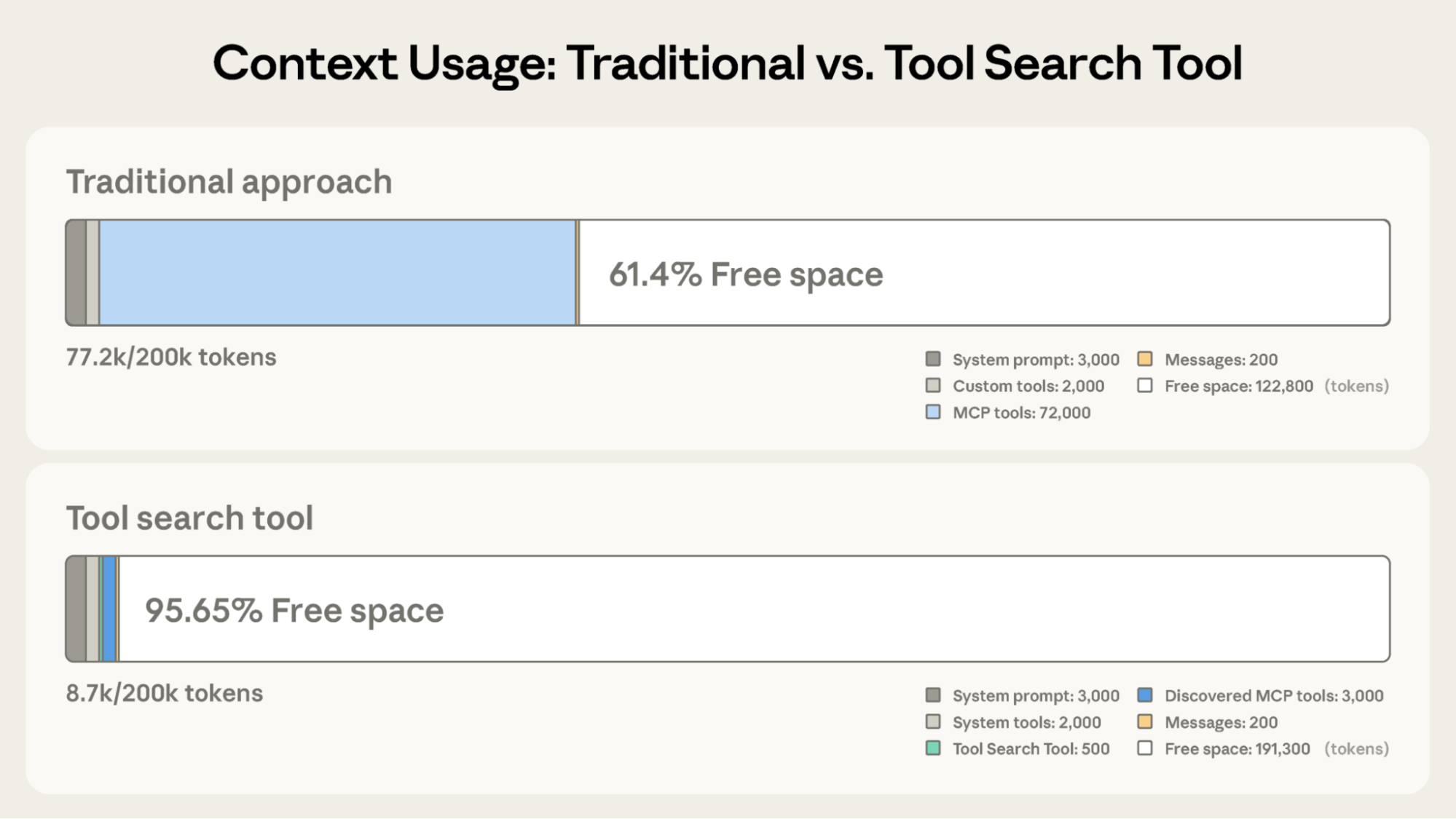 Source: Advanced tool use on the Claude Developer Platform — deferring tool schemas keeps significantly more tokens available for actual work.
Tool search is enabled by default. MCP tools are deferred (only names loaded at startup) and Claude discovers full schemas on demand via a search tool. This keeps context usage low as you add more servers.
ENABLE_TOOL_SEARCH | Behavior |
|---|---|
| (unset) | Deferred by default; loads upfront if ANTHROPIC_BASE_URL is non-first-party |
true | Always deferred, even with non-first-party base URL |
auto | Load upfront if tools fit within 10% of context, defer overflow |
auto:<N> | Custom threshold percentage (e.g., auto:5 for 5%) |
false | All tools loaded upfront, no deferral |
Requires Sonnet 4+ or Opus 4+. Haiku does not support tool search.
Description cap: Tool descriptions and server instructions are truncated at 2KB each. Keep them concise and put critical details near the start.
Output Limits
Claude Code warns when MCP tool output exceeds 10,000 tokens. Configure with:
export MAX_MCP_OUTPUT_TOKENS=50000MCP servers can also annotate individual tools with anthropic/maxResultSizeChars to declare their expected output size.
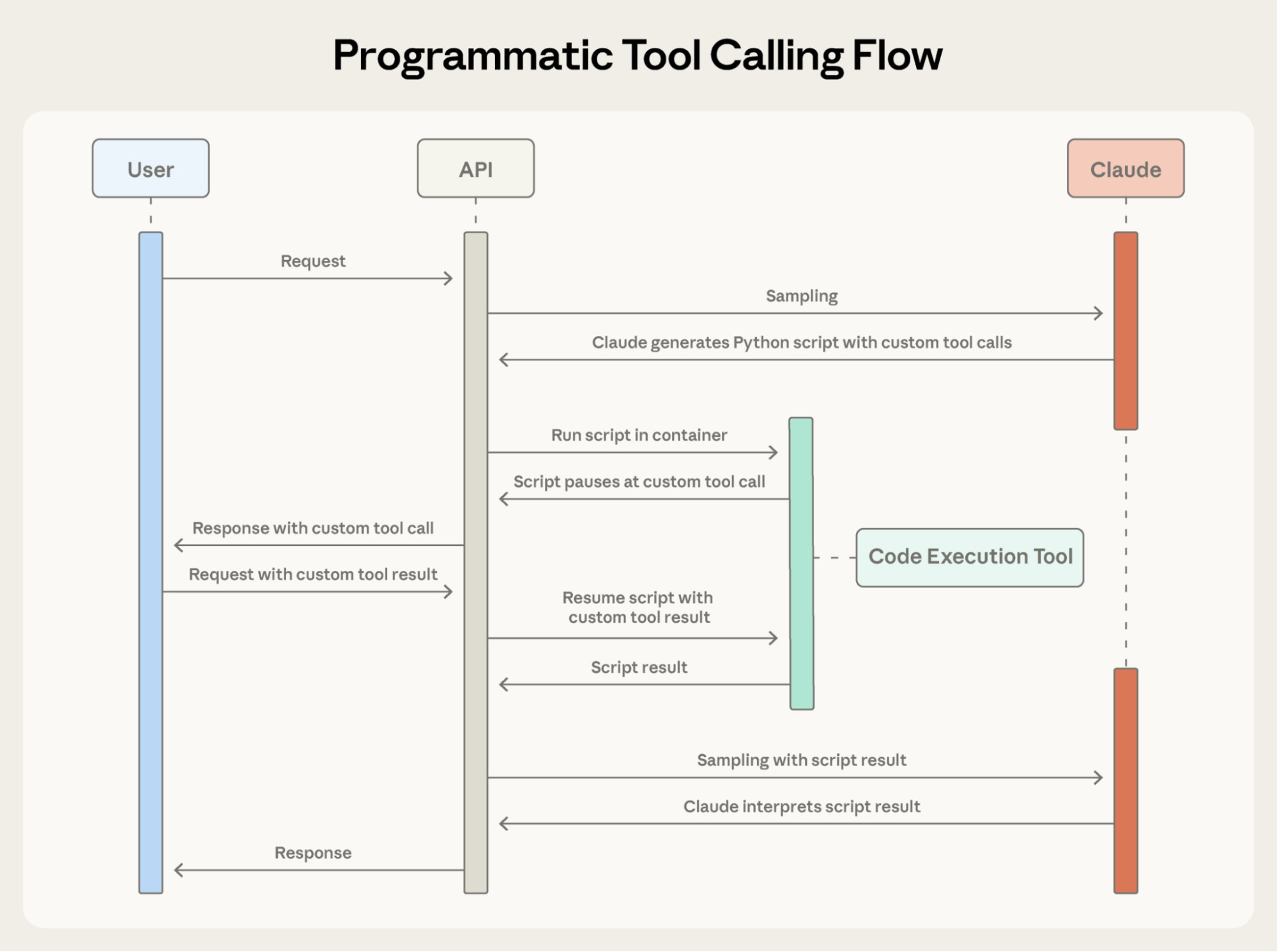 Source: Advanced tool use on the Claude Developer Platform — orchestrating tools through code enables parallel execution and avoids round-trip overhead for chained calls.
Logging in STDIO Servers
- Never use
print()orconsole.log()(corrupts JSON-RPC) - Use logging libraries that write to stderr
Managing MCP Servers
# List all configured servers
claude mcp list

# Get details for a specific server
claude mcp get github

# Remove a server
claude mcp remove github

# Check server status
> /mcp

# Add from Claude Desktop config
claude mcp add-from-claude-desktop
Elicitation
MCP servers can request structured input from the user mid-task. When a server needs information it cannot obtain on its own, Claude Code displays an interactive dialog and passes the response back.
Two modes:
- Form mode: Dialog with server-defined fields (e.g., username/password prompt)
- URL mode: Opens a browser URL for authentication or approval
No configuration required. To auto-respond without showing a dialog, use the Elicitation hook.
Enterprise Managed MCP
Two approaches for centralized control:
Option 1: Exclusive Control with managed-mcp.json
Deploy a fixed set of servers that users cannot modify. Place at:
- macOS:
/Library/Application Support/ClaudeCode/managed-mcp.json - Linux/WSL:
/etc/claude-code/managed-mcp.json - Windows:
C:\Program Files\ClaudeCode\managed-mcp.json
{
  "mcpServers": {
    "github": { "type": "http", "url": "https://api.githubcopilot.com/mcp/" },
    "sentry": { "type": "http", "url": "https://mcp.sentry.dev/mcp" }
  }
}
Option 2: Allowlists and Denylists
Allow user-configured servers within policy constraints. Entries can match by serverName, serverCommand (exact array match for stdio), or serverUrl (wildcards supported):
{
  "allowedMcpServers": [
    { "serverName": "github" },
    { "serverCommand": ["npx", "-y", "@modelcontextprotocol/server-filesystem"] },
    { "serverUrl": "https://mcp.company.com/*" }
  ],
  "deniedMcpServers": [
    { "serverName": "untrusted-server" },
    { "serverUrl": "https://*.untrusted.com/*" }
  ]
}
Denylist takes absolute precedence over allowlist. Both options can be combined.