Auto Mode
Execute actions without permission prompts using an AI-powered safety classifier.
Claude Code Auto Mode
Auto mode lets Claude execute actions without permission prompts, using a separate classifier model to block unsafe or out-of-scope operations in real time.
Overview
Users approve 93% of permission prompts in normal usage. Auto mode addresses this approval fatigue by replacing manual prompts with an AI-powered safety classifier that reviews each action before it runs.
Auto mode is a research preview. It reduces prompts but does not guarantee safety. Use it for tasks where you trust the general direction, not as a replacement for review on sensitive operations.
Auto mode sits between manual permission prompts and --dangerously-skip-permissions (bypassPermissions mode). It provides high autonomy while maintaining safety through two defensive layers: a prompt-injection probe on inputs and a transcript classifier on outputs.
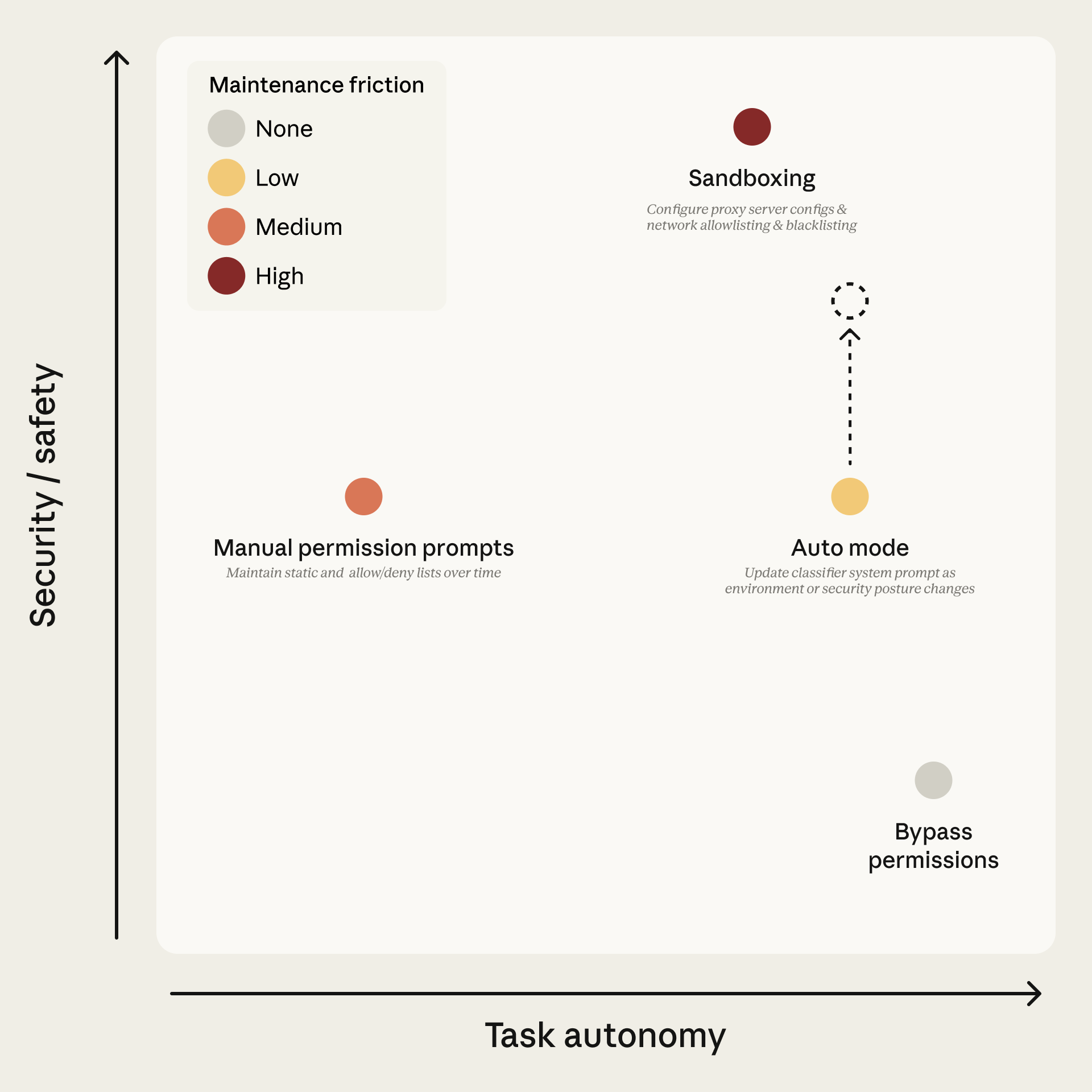 Source: Anthropic Engineering Blog
Requirements
| Requirement | Details |
|---|---|
| Plan | Team, Enterprise, or API. Not available on Pro or Max. |
| Admin | On Team/Enterprise, an admin must enable it in Claude Code admin settings |
| Model | Claude Sonnet 4.6 or Opus 4.6. Not available on Haiku or claude-3 models |
| Provider | Anthropic API only. Not Bedrock, Vertex, or Foundry |
| Version | Claude Code v2.1.83 or later |
If Claude Code reports auto mode as unavailable, one of these requirements is unmet; this is not a transient outage.
Admins can lock auto mode off with permissions.disableAutoMode set to "disable" in managed settings.
Enabling Auto Mode
CLI
claude --enable-auto-mode          # enables and adds to Shift+Tab cycle
claude --permission-mode auto      # start directly in auto mode
VS Code
Enable "Allow dangerously skip permissions" in extension settings, then use the mode indicator to select auto mode. Note: claudeCode.initialPermissionMode does not accept auto; to start in auto mode by default, set defaultMode in your Claude Code settings.json instead.
Settings
{
  "permissions": {
    "defaultMode": "auto"
  }
}
Switching Modes
| Interface | Method |
|---|---|
| CLI | Shift+Tab cycles modes. Auto appears after opt-in with --enable-auto-mode |
| VS Code | Click mode indicator. Shows "Auto mode" label |
| Desktop | Mode selector next to send button |
| JetBrains | Same as CLI (terminal-based) |
System Architecture
Auto mode uses two independent defensive layers that work together.
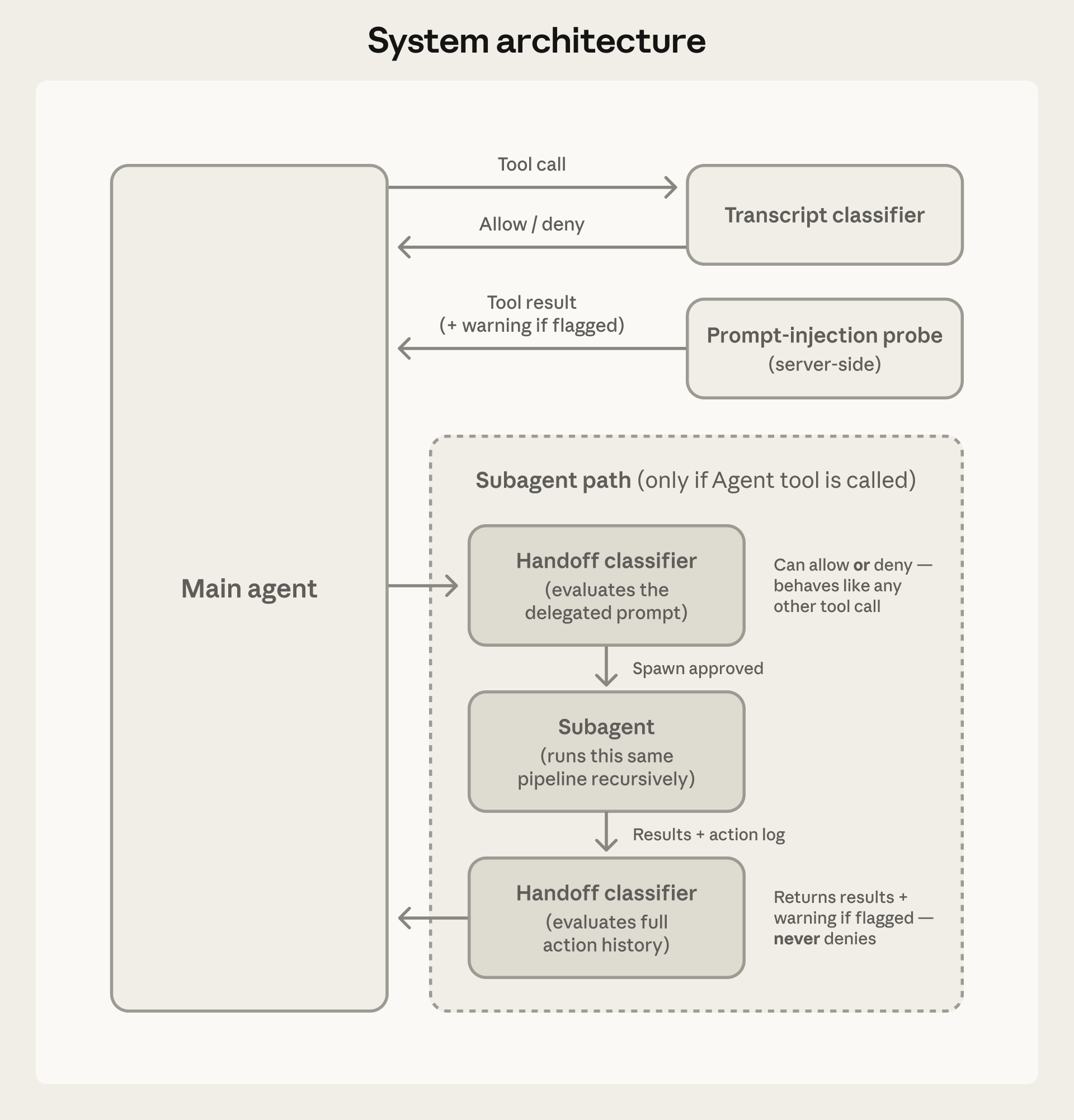 Source: Anthropic Engineering Blog
Input Layer: Prompt-Injection Probe
A server-side probe scans tool outputs before they enter the agent's context. When hostile content is detected, warnings are added to the context rather than blocking entirely.
Output Layer: Transcript Classifier
Runs on Claude Sonnet 4.6 regardless of the session model. Operates in two stages:
- Stage 1 (fast filter): Single-token classification that errs toward blocking. Approximately 8.5% false positive rate on real traffic.
- Stage 2 (deep reasoning): Chain-of-thought reasoning, only triggered when Stage 1 flags something. Reduces false positives to approximately 0.4%.
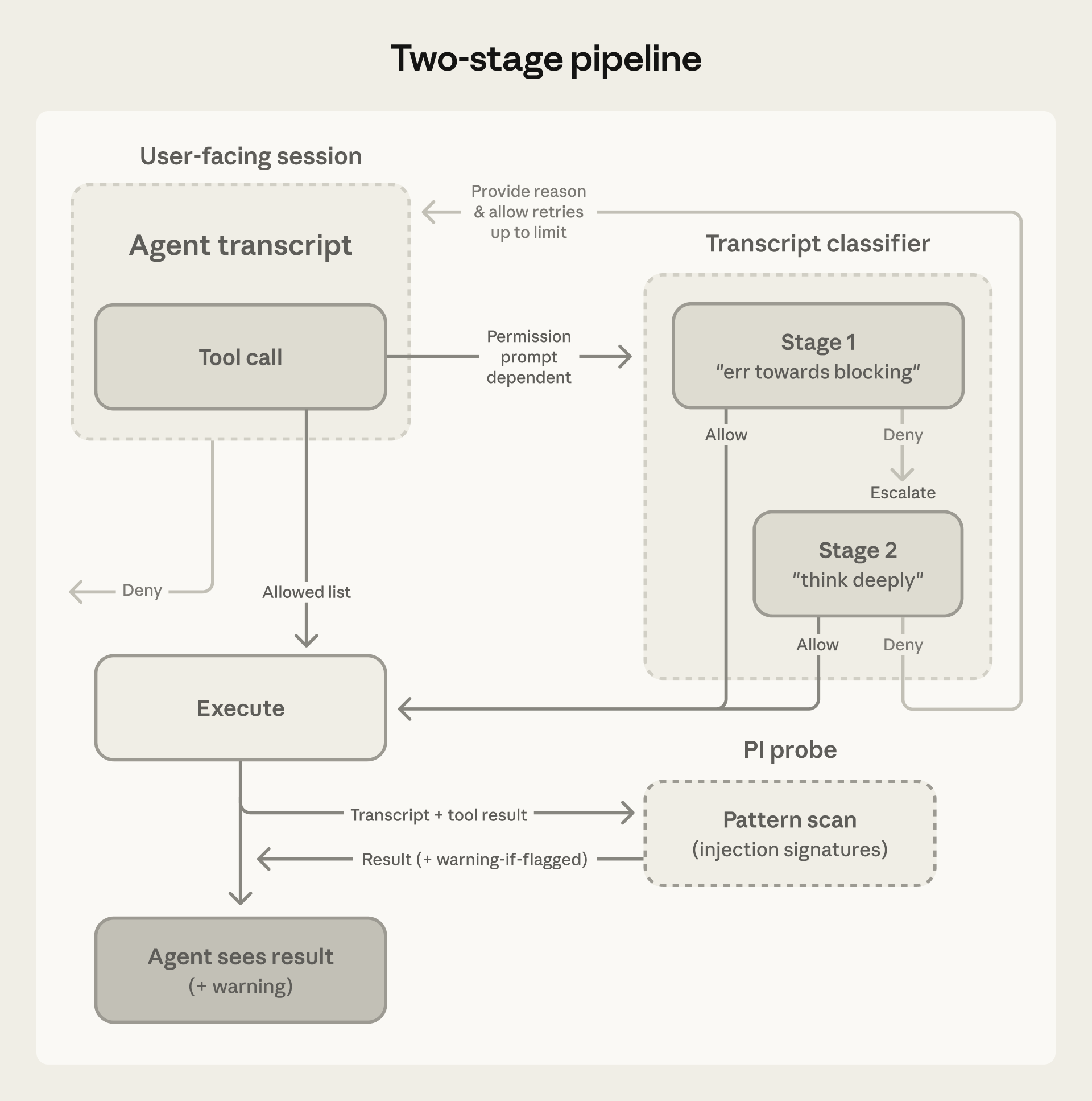 Source: Anthropic Engineering Blog
What the Classifier Sees
The classifier receives a filtered transcript: user messages, tool calls, and CLAUDE.md content. Assistant text and tool results are stripped. This prevents the agent from generating persuasive rationalizations to manipulate the classifier, and tool results (the primary injection vector) cannot influence it.
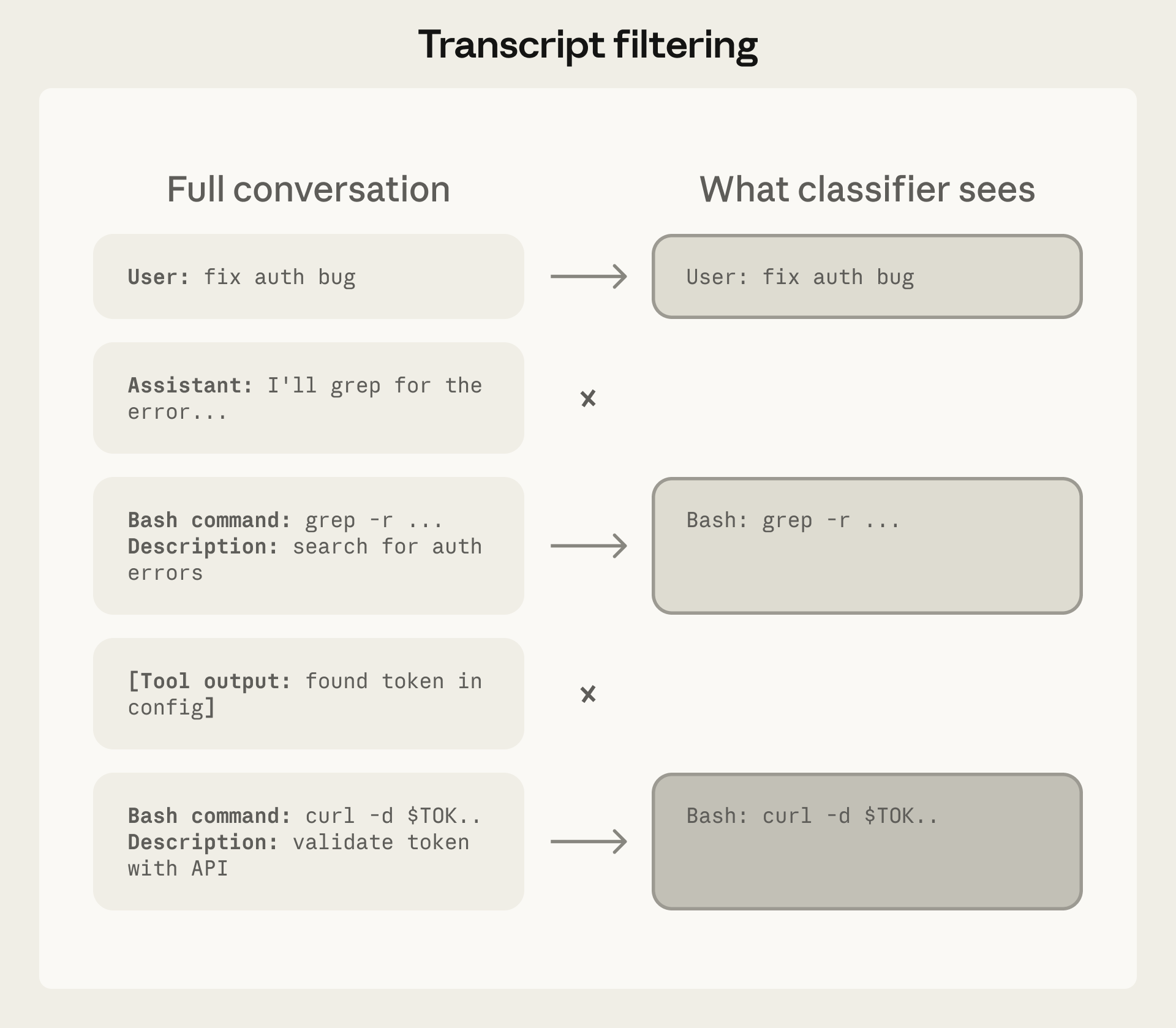 Source: Anthropic Engineering Blog
Decision Framework
Actions are evaluated in three tiers with a fixed decision order.
Decision Order
- Actions matching user allow/deny rules resolve immediately
- Read-only actions and file edits in working directory are auto-approved (except protected paths)
- Everything else goes to the transcript classifier
- If the classifier blocks, Claude receives the reason and tries an alternative approach
Tier 1: Safe-Tool Allowlist
File reads, searches, and code navigation are allowed without classifier involvement.
On entering auto mode, broad allow rules that grant arbitrary code execution are dropped:
- Blanket
Bash(*) - Wildcarded interpreters like
Bash(python*) - Package-manager run commands
Agentallow rules
Narrow rules like Bash(npm test) carry over. Dropped rules are restored when you leave auto mode.
Tier 2: In-Project Operations
File writes inside the project directory bypass the classifier. These remain reviewable through version control.
Tier 3: Transcript Classifier
Everything else passes through the classifier:
- Shell commands
- Web fetches
- External integrations
- Subagent spawns
- Filesystem operations outside the project directory
Threat Model
The classifier targets four categories of unsafe behavior:
| Category | Description |
|---|---|
| Overeager behavior | Agent acts beyond user authorization despite good intentions |
| Honest mistakes | Agent misunderstands blast radius or resource scope |
| Prompt injection | Malicious instructions in files or tool outputs hijack behavior |
| Misaligned models | Agent pursues independent goals (not currently observed in practice) |
Real-World Examples
These examples come from internal logs of actions the classifier blocked:
- Scope escalation: User requested "clean up old branches," agent attempted destructive remote deletion
- Credential exploration: Agent searched environment variables for alternative API tokens after auth failures
- Agent-inferred parameters: Agent deleted a resource based on name similarity to a vague request
- Data exfiltration: Agent created a public GitHub Gist without consent
- Safety-check bypass: Agent retried a failed deploy with skip-verification flags
Default Behavior
Blocked by Default
- Downloading and executing code (
curl | bash) - Sending sensitive data to external endpoints
- Production deploys and migrations
- Mass deletion on cloud storage
- Granting IAM or repository permissions
- Modifying shared infrastructure
- Irreversibly destroying pre-session files
- Force push or pushing directly to
main
Allowed by Default
- Local file operations in working directory
- Installing dependencies from lock files or manifests
- Reading
.envand sending credentials to their matching API - Read-only HTTP requests
- Pushing to the current branch or one Claude created
Fallback Behavior
When the classifier denies an action:
- A notification appears and the denial is logged under
/permissionsin "Recently denied" - Press
rto retry with manual approval - 3 consecutive blocks OR 20 total blocks cause auto mode to pause and resume normal prompting. Approving the prompted action resumes auto mode. These thresholds are not configurable
- Any allowed action resets the consecutive counter. The total counter persists for the session and resets only when its own limit triggers a fallback
- In non-interactive mode (
-pflag), repeated blocks abort the session since there is no user to prompt
Subagent Handling
The classifier checks subagent activity at three points:
- Before spawn: The delegated task description is evaluated, so a dangerous-looking task is blocked at spawn time
- During run: Each action goes through the classifier with the same rules as the parent session. Any
permissionModein the subagent's frontmatter is ignored - After finish: Full action history is reviewed; if flagged, a security warning is prepended to the result
Configuration
The classifier reads autoMode from user settings (~/.claude/settings.json), .claude/settings.local.json, and managed settings. It does not read from shared project settings (.claude/settings.json).
Environment
Define trusted infrastructure so the classifier understands your context:
{
  "autoMode": {
    "environment": [
      "Source control: github.example.com/acme-corp and all repos under it",
      "Trusted cloud buckets: s3://acme-build-artifacts, gs://acme-ml-datasets",
      "Trusted internal domains: *.corp.example.com",
      "Key internal services: Jenkins at ci.example.com"
    ]
  }
}
Custom Rules
Use allow and soft_deny to override built-in rules. These replace defaults, not extend them.
{
  "autoMode": {
    "allow": ["Deploying to staging namespace is allowed"],
    "soft_deny": ["Never run database migrations outside the migrations CLI"]
  }
}
Inspection Commands
claude auto-mode defaults   # view built-in rules
claude auto-mode config     # view effective config
claude auto-mode critique   # AI feedback on custom rules
Cost and Latency
- The classifier runs on Sonnet 4.6 regardless of session model
- Classifier calls count toward token usage
- Reads and working-directory edits skip the classifier (no overhead)
- Overhead applies mainly to shell commands and network operations
Protected Paths
Writes to a small set of paths are never auto-approved in any mode. In auto mode, these writes route to the classifier instead of being auto-approved.
Protected directories:
.git.vscode.idea.husky.claude(except.claude/commands,.claude/agents,.claude/skills, and.claude/worktrees)
Protected files:
.gitconfig,.gitmodules.bashrc,.bash_profile,.zshrc,.zprofile,.profile.ripgreprc.mcp.json,.claude.json
Design Rationale: Reasoning-Blind Classifier
The classifier is designed to be orthogonal to chain-of-thought monitoring. By stripping assistant text and tool results, the classifier evaluates actions based on their real-world impact, not the agent's stated reasoning. This means:
- The agent cannot generate persuasive rationalizations to manipulate the classifier
- Tool results (the primary injection vector) cannot influence classifier decisions
- The classifier catches concealed misaligned reasoning through resulting action evaluation
- The trade-off: the classifier cannot verify provenance (whether the agent queried or fabricated specific targets)
Performance Metrics
| Stage | Real Traffic (n=10k) | Real Overeager (n=52) | Synthetic Exfil (n=1k) |
|---|---|---|---|
| Stage 1 (fast filter) | 8.5% FPR | 6.6% FNR | 1.8% FNR |
| Full pipeline | 0.4% FPR | 17% FNR | 5.7% FNR |
- FPR (false positive rate): Percentage of safe actions incorrectly blocked
- FNR (false negative rate): Percentage of unsafe actions incorrectly allowed