Memory and Context
Hierarchical memory system that maintains context across sessions and manages the context window.
Claude Code Memory and Context
Claude Code uses a hierarchical memory system to maintain context across sessions and manage the context window effectively.
CLAUDE.md Files
CLAUDE.md is a special file that Claude reads at the start of every session. It serves as persistent memory that bridges the gap between what Claude can infer from code alone and what it needs to know from your team's conventions, workflows, and preferences.
Key Characteristics
- Automatically loaded into context every session
- Not ephemeral like conversation history
- Shared with team members when checked into version control
- Can import additional files using
@path/to/filesyntax - Survives context compaction during long sessions
Memory File Hierarchy
| Memory Type | Location | Purpose | Scope |
|---|---|---|---|
| Managed policy | System-level | Organization-wide instructions | All users |
| User memory | ~/.claude/CLAUDE.md | Personal preferences | All projects |
| User rules | ~/.claude/rules/ | Personal topic-specific | All projects |
| Project memory | ./CLAUDE.md or ./.claude/CLAUDE.md | Team-shared instructions | Team via VCS |
| Project rules | ./.claude/rules/*.md | Topic-specific instructions | Team via VCS |
| Project local | ./CLAUDE.local.md | Personal project overrides | Local only |
Priority Order (Higher = Loads First)
- Managed policy (organization-wide)
- User memory (
~/.claude/CLAUDE.md) - User-level rules (
~/.claude/rules/) - Project memory (
./.claude/CLAUDE.mdor./CLAUDE.md) - Project rules (
./.claude/rules/) - Parent directory memories (for monorepos)
- Child directory memories (loaded on-demand)
Context Discovery
Recursive Memory Discovery
Claude Code discovers CLAUDE.md files using both upward and downward traversal:
Upward Discovery (Loaded at Startup):
- Starts in current working directory
- Walks up the directory tree to repository root
- Loads all
CLAUDE.mdandCLAUDE.local.mdfiles found along the path - Enables monorepo support by loading parent-level context
Downward Discovery (Loaded On-Demand):
- Discovers
CLAUDE.mdfiles in subdirectories below current working directory - Loads them only when you read files in those subdirectories
- Prevents context bloat in large monorepos with many packages
- Ensures you get relevant context without overwhelming the context window
Memory Imports
CLAUDE.md files can import other files:
# Project Guidelines

See our API conventions: @docs/api-conventions.md

Personal preferences: @~/.claude/my-preferences.md- Relative paths allowed
- Absolute paths allowed
- Home directory imports:
@~/.claude/file.md - Maximum import depth: 5 hops
- Imports NOT evaluated inside code spans/blocks
View Loaded Memory
Run /memory to see all memory files currently loaded.
Monorepo and Large Codebase Support
Claude Code's hierarchical memory system is designed for large codebases and monorepos with multiple packages, services, or components. It automatically discovers and loads CLAUDE.md files from parent and child directories based on where you're working.
How Hierarchical Discovery Works
Upward Traversal (Parent Directories)
When you start Claude Code, it walks up the directory tree from your current working directory to discover context:
/workspace/                      # Root CLAUDE.md (loaded)
├── CLAUDE.md
└── packages/
    ├── CLAUDE.md                # Package-level CLAUDE.md (loaded)
    └── web/
        ├── CLAUDE.md            # Component CLAUDE.md (loaded)
        └── src/                 # ← You run `claude` here
All CLAUDE.md files from your current directory up to the repository root are loaded at startup.
Downward Traversal (Child Directories)
Claude Code also discovers CLAUDE.md files in subdirectories, but loads them on-demand to prevent context bloat:
/workspace/packages/web/         # ← You run `claude` here
├── CLAUDE.md                    # Loaded at startup
├── src/
│   ├── frontend/
│   │   └── CLAUDE.md            # Loaded when you read files in frontend/
│   └── backend/
│       └── CLAUDE.md            # Loaded when you read files in backend/
Why On-Demand Loading?
In a monorepo with 50 packages, loading all 50 CLAUDE.md files at startup would bloat your context. Instead, Claude loads subdirectory memories only when you actually work with files in those directories.
Example: Multi-Package Monorepo
monorepo/
├── CLAUDE.md                    # System overview, modernization strategy
├── packages/
│   ├── CLAUDE.md                # Component architecture, technical debt
│   ├── ui/
│   │   └── CLAUDE.md            # UI patterns, component library
│   ├── api-client/
│   │   └── CLAUDE.md            # API design, data modules
│   └── test-cases/
│       └── CLAUDE.md            # Test coverage, test patterns
When you run claude from packages/ui/:
- ✅ Loaded at startup:
monorepo/CLAUDE.md,packages/CLAUDE.md,packages/ui/CLAUDE.md - ⏳ Loaded on-demand:
api-client/CLAUDE.md(when you read files inapi-client/) - ⏳ Loaded on-demand:
test-cases/CLAUDE.md(when you read files intest-cases/)
Controlling Discovery with claudeMdExcludes
In large monorepos, you may want to exclude certain CLAUDE.md files (e.g., from other teams' packages). Use the claudeMdExcludes setting:
In .claude/settings.json:
{
  "claudeMdExcludes": [
    "**/node_modules/**",
    "packages/legacy-*/**",
    "team-b/**"
  ]
}
This prevents Claude from loading CLAUDE.md files matching these patterns, even when discovering them upward or on-demand.
Best Practices for Monorepos
- Root-level CLAUDE.md: System overview, shared conventions, team structure
- Package/service-level CLAUDE.md: Component-specific architecture, dependencies
- Feature-level CLAUDE.md: Highly specific context for complex subdirectories
- Use
claudeMdExcludes: Filter out unrelated packages/teams - Keep each file focused: Avoid duplicating information between levels
Working from Different Directories
The memory that gets loaded depends on where you start Claude:
# From root - loads only root CLAUDE.md
cd /workspace && claude

# From packages/web - loads root + packages + web
cd /workspace/packages/web && claude

# From packages/api - loads root + packages + api
cd /workspace/packages/api && claude
Each location gives you the right level of context for the code you're working on.
Context Window Management
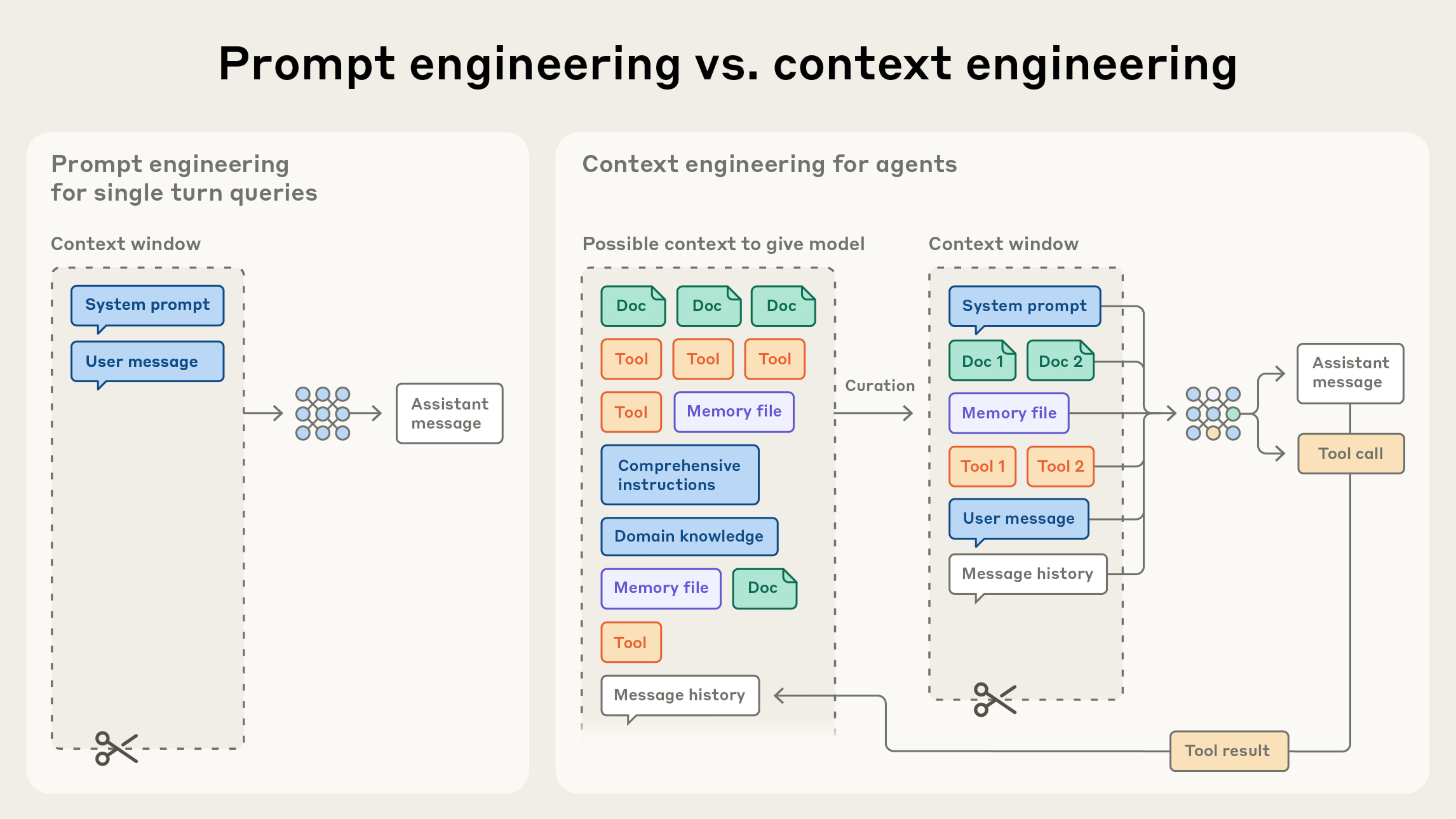 Source: Effective context engineering for AI agents — context engineering is iterative, shaping what the model sees as the conversation progresses.
What Fills Context
- Conversation history
- File contents you've read
- Command outputs
- CLAUDE.md and skills
- System instructions
- MCP tool definitions
Automatic Compaction
When approaching context limit (~95% by default), Claude automatically compacts:
What gets preserved:
- CLAUDE.md and rules (always kept in full)
- Recent conversation history
- Your most recent requests
- Key code snippets from recent context
- Current task state
What may be summarized or removed:
- Older tool outputs (file contents, command results)
- Earlier conversation turns
- Verbose search results
- Intermediate debugging output
What triggers compaction:
- Default: 95% of context window used
- Override:
CLAUDE_AUTOCOMPACT_PCT_OVERRIDE=50(triggers at 50%)
Manual Compaction
/compact- Trigger with default behavior/compact <focus>- Preserve specific context (e.g.,/compact focus on API changes)- Add "Compact Instructions" to CLAUDE.md to control what's preserved
Check Context Usage
/context- Visualize what's consuming space/mcp- Check per-server costs for MCP tools
Best Practices
Managing Context
- Use
/clearbetween unrelated tasks - Reset context entirely - Keep CLAUDE.md concise - Prune improves adherence
- Use subagents for investigation - They run in separate context
- Use skills for domain knowledge - Load on-demand
- Use hooks for deterministic actions - Don't consume context
- Reduce MCP server overhead - Only enable servers you need
What to Include in CLAUDE.md
Include:
- Bash commands Claude can't guess
- Code style rules that differ from defaults
- Testing instructions and preferred test runners
- Repository etiquette (branch naming, PR conventions)
- Architectural decisions specific to your project
- Developer environment quirks
- Common gotchas or non-obvious behaviors
Exclude:
- Anything Claude can figure out from code
- Standard language conventions
- Detailed API documentation (link instead)
- Information that changes frequently
- Long explanations or tutorials
- File-by-file descriptions
- Self-evident practices
Quality Test
For each line in CLAUDE.md, ask: "Would removing this cause Claude to make mistakes?" If not, cut it.
Structuring CLAUDE.md
Recommended Format
# [Project Name]

[Brief purpose statement]

## Quick Start
- Common commands (build, test, deploy)
- Essential setup steps

## Code Style
- Language-specific conventions that differ from defaults
- Import/export preferences
- Naming conventions

## Workflow
- Branch naming conventions
- Commit message format
- PR review expectations
- Testing requirements

## Architecture
- Key architectural patterns
- How major components connect
- Directory structure explanation

## Environment
- Required environment variables
- Local development setup quirks
- Dependency installation

## Gotchas & Non-Obvious Behaviors
- Common mistakes and how to avoid them
- Performance considerations
- Known limitations
Modular Rules
For larger projects, organize into .claude/rules/:
.claude/
├── CLAUDE.md                 # Main instructions
└── rules/
    ├── code-style.md         # Language-specific guidelines
    ├── testing.md            # Testing conventions
    ├── api-design.md         # API standards
    └── security.md           # Security requirements
Path-Specific Rules
Each rule file can have optional YAML frontmatter:
---
paths:
  - "src/api/**/*.ts"
---

# API Development Rules
- All endpoints must include input validation
- Use standard error response format
- Include OpenAPI documentation comments
Providing Context Techniques
- Reference files with
@- Use@path/to/fileinstead of describing - Paste images directly - Copy/paste or drag/drop for visual reference
- Provide URLs - Paste documentation links
- Pipe in data - Use
cat error.log | claude - Let Claude fetch - Ask Claude to pull context using Bash or MCP tools
Token Reduction Strategies
- Choose the right model (Sonnet for most, Opus for complex)
- Adjust extended thinking budget
- Offload verbose operations to subagents
- Move instructions from CLAUDE.md to skills
- Write specific prompts (details reduce back-and-forth)
- Manage context proactively with
/clearand/compact
Progressive Disclosure
Don't embed all knowledge in CLAUDE.md -- tell Claude where to find information instead of loading it all upfront. This recovers significant context budget.
Instead of:
## API Error Codes
- 400: Bad Request -- missing required fields
- 401: Unauthorized -- invalid or expired token
... (20 more lines)
Use a pointer:
## API Conventions
For error codes and response formats: see docs/api-conventions.md
Mechanisms:
| Mechanism | How | When loaded |
|---|---|---|
@path/to/file imports | Inline reference in CLAUDE.md | When CLAUDE.md is loaded (up to 5 levels deep) |
.claude/rules/ files | Auto-discovered markdown files | At session start, alongside CLAUDE.md |
| Skills | .claude/skills/<name>/SKILL.md | On-demand, triggered by relevance |
| Reference pointers | Plain text "see docs/x.md" | When Claude reads the referenced file |
Progressive disclosure can recover ~15,000 tokens per session compared to loading everything upfront.
CLAUDE.md vs Skills vs Hooks
Three mechanisms serve different purposes:
| Mechanism | When to use | Behavior | Compliance |
|---|---|---|---|
| CLAUDE.md | Static context that rarely changes | Always loaded, advisory | ~80% |
| Skills | Domain knowledge loaded on demand | Triggered by relevance | ~80% |
| Hooks | Rules enforced 100% of the time | Deterministic, automated | 100% |
CLAUDE.md is for conventions, architecture, and commands Claude needs every session. Skills are for detailed workflows that only apply sometimes (e.g., deployment guide). Hooks are for non-negotiable rules (e.g., linting before commits).
Key insight: CLAUDE.md is advisory. The system prompt even says "this context may or may not be relevant to your tasks." If something must happen without exception, make it a hook.
Size and Token Budget
CLAUDE.md is loaded into every conversation turn and survives context compaction -- it's always present. This makes it powerful but expensive.
Guidelines:
- Target under 200 lines -- adherence degrades with longer files
- Monitor with
/context-- CLAUDE.md should use less than 10-15% of context budget - Every line must earn its place -- "Would removing this cause Claude to make mistakes?" If no, cut it
- Start small, grow carefully -- 5 rules initially, add one per week, prune monthly
- It's a system prompt, not documentation -- README informs humans, CLAUDE.md directs AI behavior
Give Claude Verification Methods
The highest-leverage content in CLAUDE.md is how Claude can check its own work:
- Exact test commands --
uv run pytest tests/ -xnot just "pytest" - Expected outputs -- what success looks like
- Quality check sequence -- lint, type check, format, test
Claude performs dramatically better when it can verify its own work.
Formatting Recommendations
Official Anthropic guidance and community best practices for CLAUDE.md formatting:
- Use markdown headers and bullets -- structure helps Claude scan quickly
- One header per topic -- clear section boundaries
- Code blocks for all commands -- exact invocations, not descriptions
- Brief rationale for each constraint -- "why" helps Claude judge edge cases
- No tables required -- bullet lists work equally well; use tables only when comparing side-by-side options
- Well-structured files outperform short unstructured ones -- formatting is signal
Common Anti-Patterns
Over-specified -- including code style rules that a linter enforces. Never send an LLM to do a linter's job.
Kitchen-sink growth -- adding rules every time something goes wrong without pruning. Treat CLAUDE.md like code: review, prune, test.
Auto-generated without review -- /init output often includes obvious information Claude already knows.
Non-universal instructions -- task-specific instructions that only apply to one feature. These belong in skills or the conversation prompt.
No verification methods -- telling Claude what to do but not how to check if it did it correctly.
Negative-only rules -- a file full of "don't do X" without positive guidance wastes tokens on low-value constraints.